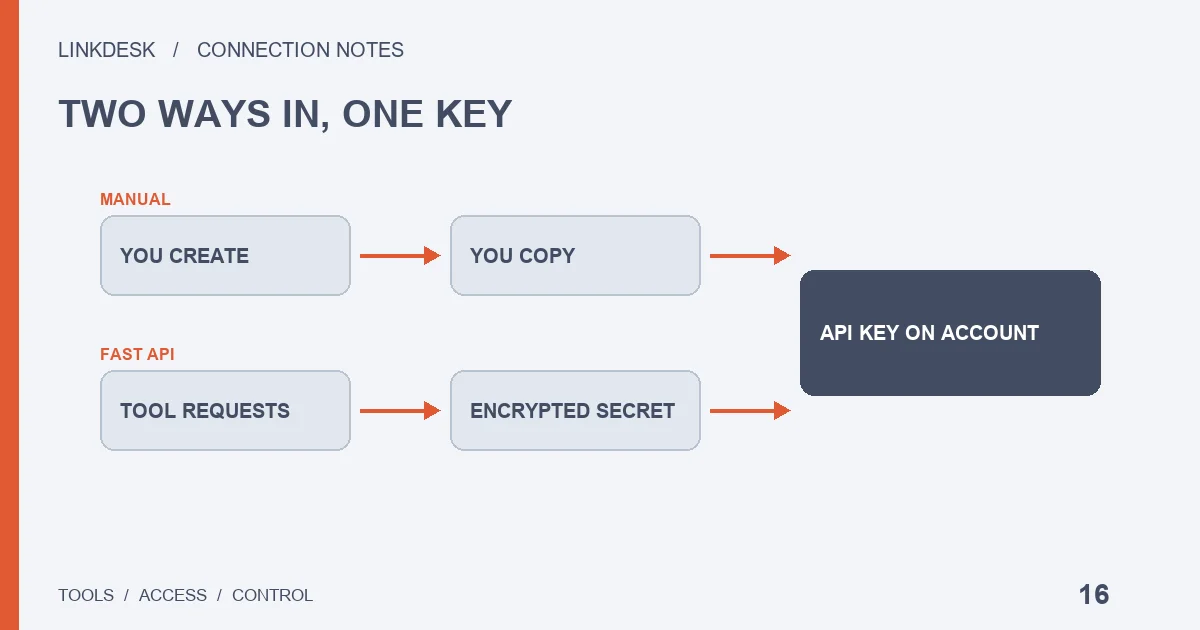
Done by hand, you create the key under API Management and copy the API Key and Secret Key into the tool. Done through quick connect, the tool asks Binance’s Fast API to create the key for you, and the Secret Key travels to the tool encrypted. You never see it. The copy-and-paste step disappears; what the tool ends up holding does not shrink.
What “quick connect” on a trading platform actually does
Plenty of dashboards, copy-trading services and bot platforms offer two ways to link Binance. One is a pair of input boxes for an API Key and a Secret Key. The other is a single button, labelled something like Quick connect or Connect with Binance. Behind that button is Binance’s Fast API.
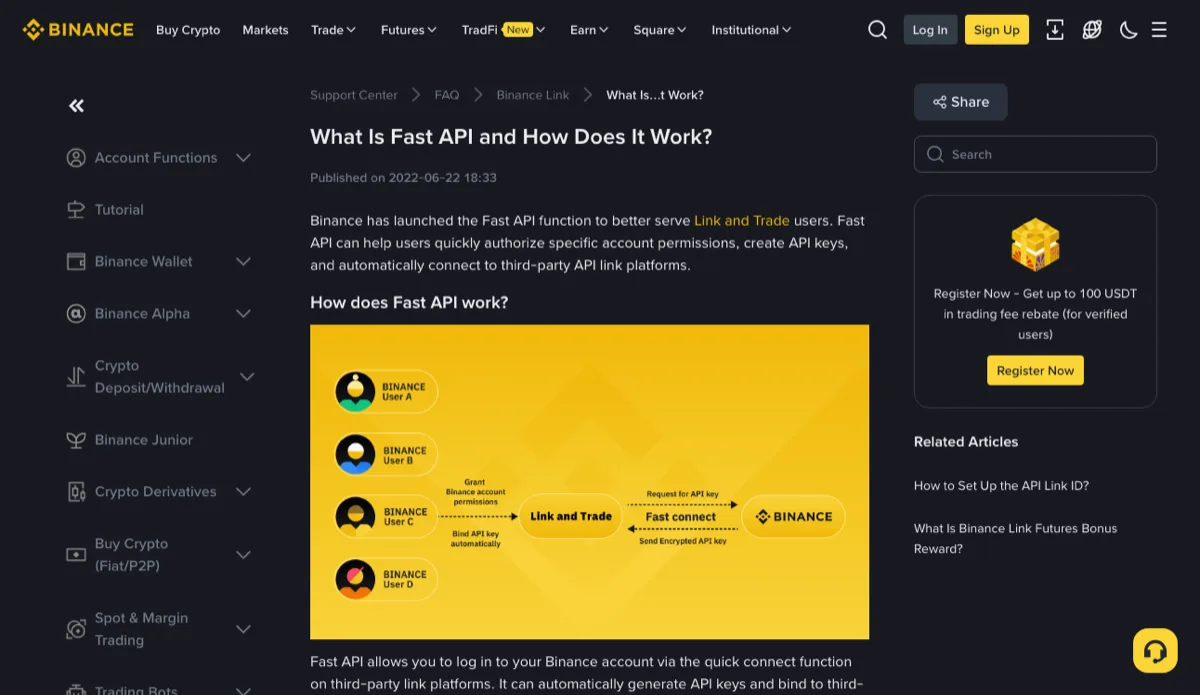
Binance’s Help Center article “What Is Fast API and How Does It Work?” (published 22 June 2022) says Fast API lets you log in to your Binance account through the quick connect function on a third-party link platform, grant specific account permissions, and have an API key generated and bound to that platform automatically, so you skip creating and pasting the key yourself.
That makes it easy to misread as a lighter kind of access. It isn’t. The platform still receives an API key that can call your account’s endpoints, and every question you would ask about a manual key — permissions, IP restriction, how to shut it off — still applies.
After you click authorize: what Binance hands the platform
The diagram on that Help Center page has three parties. You grant account permissions to the link platform, the platform requests an API key from Binance, and Binance sends an encrypted API key back.
The developer documentation for the endpoint that does the work, POST /v1/api-key/create (“Create API key for User”), fills in the detail:
- The platform calls it with the access token it received when you authorized, and creates the key on your behalf.
- The request carries the platform’s own RSA public key. Binance encrypts the new key with it, and the platform decrypts it with the matching private key.
- The response contains both
apiKeyandsecretKey.
That last point is the one to hold on to. With a manual key, the secret appears on your screen at least once and you know exactly where you pasted it. With Fast API, it exists only on the platform’s side from the moment it is created. How the platform stores it, whether it is encrypted at rest, who on its staff could read it: those answers live in the platform’s own security documentation, not on any Binance page.
The key’s name (apiName) is also chosen by the platform, and the docs note that names can repeat. Whatever you later see in your key list is whatever the platform decided to call it.
Which permissions a Fast API key can carry — and is withdrawal one of them?
The permission switches in that request are enableTrade (spot trading), enableFutureTrade (futures), enableMargin and enableEuropeanOptions. The last two default to false if the platform leaves them out, or if your account has no margin or options account.
There is no withdrawal switch in the parameter list. Whether a Fast API key could later be given withdrawal access some other way, the documentation doesn’t say. A trading tool has no business asking for it anyway, for the reasons laid out in read, trade and withdraw permissions.
IP restriction is set by the status field: 1 or empty means unrestricted, 2 means trusted IPs only, 3 means trusted third-party IPs only. Trusted addresses go in ipAddress, up to 30 per key. The docs add a hard rule: enabling any trade permission, whether spot, margin or futures, requires restricting IP access.
So a Fast API key that can place orders should be bound to IP addresses, normally the platform’s own server egress. If the authorization screen lists the requested permissions, compare them with what you actually want the tool to do before you approve. If it shows nothing, check afterwards in your account (see below).
Creating the key yourself: the choices that stay with you
The Help Center article “How to Create API Keys on Binance?” (last updated 20 March 2025) gives the path: profile icon → Account → API Management → Create API. Three things have to be in place first: two-factor authentication turned on, any amount deposited into your Spot Wallet, and identity verification completed.
On this path, the following are your calls rather than the tool’s:
- Key type. System-generated keys use HMAC; self-generated keys use Ed25519 or RSA, and you hand Binance only the public half. Which to pick depends on what the tool supports, covered in the key types guide.
- Label. Name it after the tool and the date, and a later clean-up becomes a matter of reading the list.
- IP restriction. The same article states that an HMAC key with unrestricted IP access has no permission beyond reading, and that adding an IP restriction in IPv4 format is mandatory before withdrawal can be enabled. Which address to enter starts from where the requests leave, as explained in the IP allowlist guide.
- Every permission switch, and whether to change any of them later.
The cost is that the secret passes through your hands. Binance’s API FAQ says Secret Keys are only visible when the key is created, and a lost one means creating a new key. The same FAQ warns that entering your API Key or Secret Key into any third-party platform is a security risk, and that Binance does not support third-party services or tools. Copy it straight into the tool, then close the page; a chat message, a screenshot or a shared document is not a place for it to sit.
Quick connect or a pasted key: three questions that decide it
Neither route is safer by default. Each puts the risk in a different spot, and three questions usually settle which one fits this connection:
- Do you want to set every switch yourself? If the goal is read-only with no futures, a key you create gives you that directly. With Fast API the platform proposes the permission set; your part is reading the authorization screen and checking afterwards.
- How many platforms will you connect? The Fast API page states that each Binance account can only connect to one link platform via Fast API. Trying several services side by side will likely mean connecting some of them manually.
- Whose machine runs the tool? A script on your own server can only use a key you create. Fast API is for platforms Binance has admitted: the Help Center lists entity and OAuth security KYB checks and a security audit, and a platform that fails the audit cannot use it.
When a tool offers both and needs nothing more than balances, a hand-made read-only key tends to be the tidier choice: the permissions are plain to see, the label is yours, and deleting it later involves no guessing. When the tool has to trade, quick connect spares you from tracking down its egress IP — provided you are comfortable with the secret living only on the platform’s side from day one.
Stopping the tool: both kinds of key are cleaned up in API Management
Neither the Fast API Help Center page nor the developer docs describe a way to revoke the authorization. What is certain is that Fast API produces an API key on your account, so the exit runs the same way as for a manual connection. Disconnecting inside the tool or deleting its app is not the end of it; the key itself has to go on the Binance side.
- Open API Management and go through each key’s label, creation time and permissions. A Fast API key carries whatever name the platform gave it — maybe the platform’s name, maybe a string you won’t recognise.
- For a key you can’t place, see whether its creation time matches the day you clicked authorize.
- Once you are sure nothing else depends on it, disconnect in the tool first, so it stops retrying with the old key, and then delete the key.
If nothing in API Management matches and the tool still shows as connected, send the tool’s support a screenshot with the time, and contact Binance support if it still doesn’t add up. The full routine for a normal exit is in leaving a trading tool. If you suspect the key has leaked, the order is different: go to key rotation and emergency revocation.
“Revoke Binance authorization” search results about wallet approvals
Search for revoking a Binance authorization and wallet content turns up alongside API pages: guides to token approvals in Binance Wallet, the Web3 wallet. An approval there means you allowed a smart contract on-chain to spend tokens from your wallet, and revoking it happens inside the wallet.
That is a separate system from the API access in this guide. One governs what a contract may spend from an on-chain wallet; the other governs what a third-party tool may call on your exchange account. Revoking a wallet approval leaves your API keys working, and deleting an API key does nothing to wallet approvals. If you are unsure which kind you granted, recall where it happened: a “connect Binance” step inside a trading tool belongs to API Management; connecting a dApp or signing an approval in a wallet belongs to the wallet.
Before connecting anything, the permission check walks through which access a given purpose needs.